
Samsung News closes on December 21, 2026. Samsung Messages closed in July.
Two shutdowns. Two very different ways of telling people. And that’s exactly the lesson.
Every product eventually gets retired, merged or rebranded. What matters is how you communicate the change to your customers.
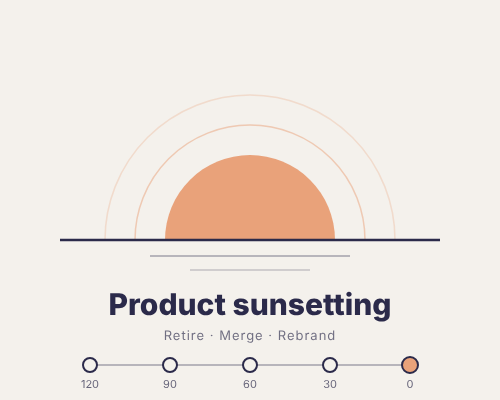
This is your product shutdown playbook: seven steps, a timeline, recommended notice periods, and mistakes that can drive customers away. Use it whether you’re shutting a feature, retiring a product line, or rebranding the whole company.
Why the announcement matters more than the decision
Customers don’t always leave because a product changes. They may leave because the change catches them off guard.
Here’s the evidence. Rework’s guide to retiring product features shares findings from several companies. A quick note first: these are secondhand figures from vendor research, so treat them as directional.
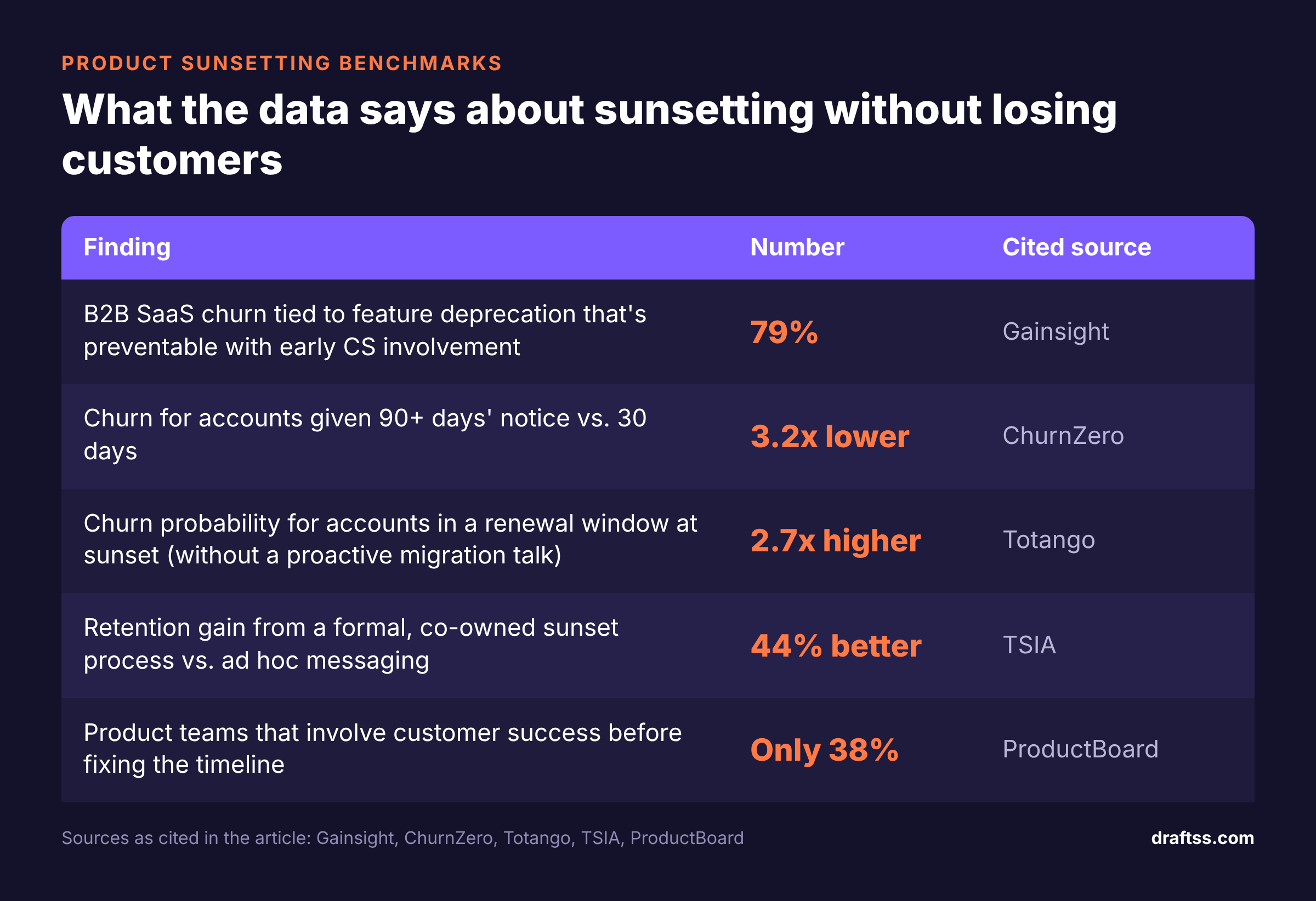
The fourth row suggests that a planned shutdown process can improve retention compared with unplanned communication. However, the reported 44% figure should be treated as a finding from the cited research, not a guaranteed result. You don’t need a bigger budget. You need a checklist.
Customer trust is just as important. Edelman’s 2025 special report (15,000 respondents, 15 countries) found that 80% of people trust the brands they use, and that trust weighs as much in purchase decisions as quality and price. A poorly handled shutdown can quickly damage that trust.
Two Samsung shutdowns, two playbooks
Samsung makes a useful example because we can compare two of its recent product shutdowns. This is based on public reporting, not inside knowledge of Samsung’s plans.
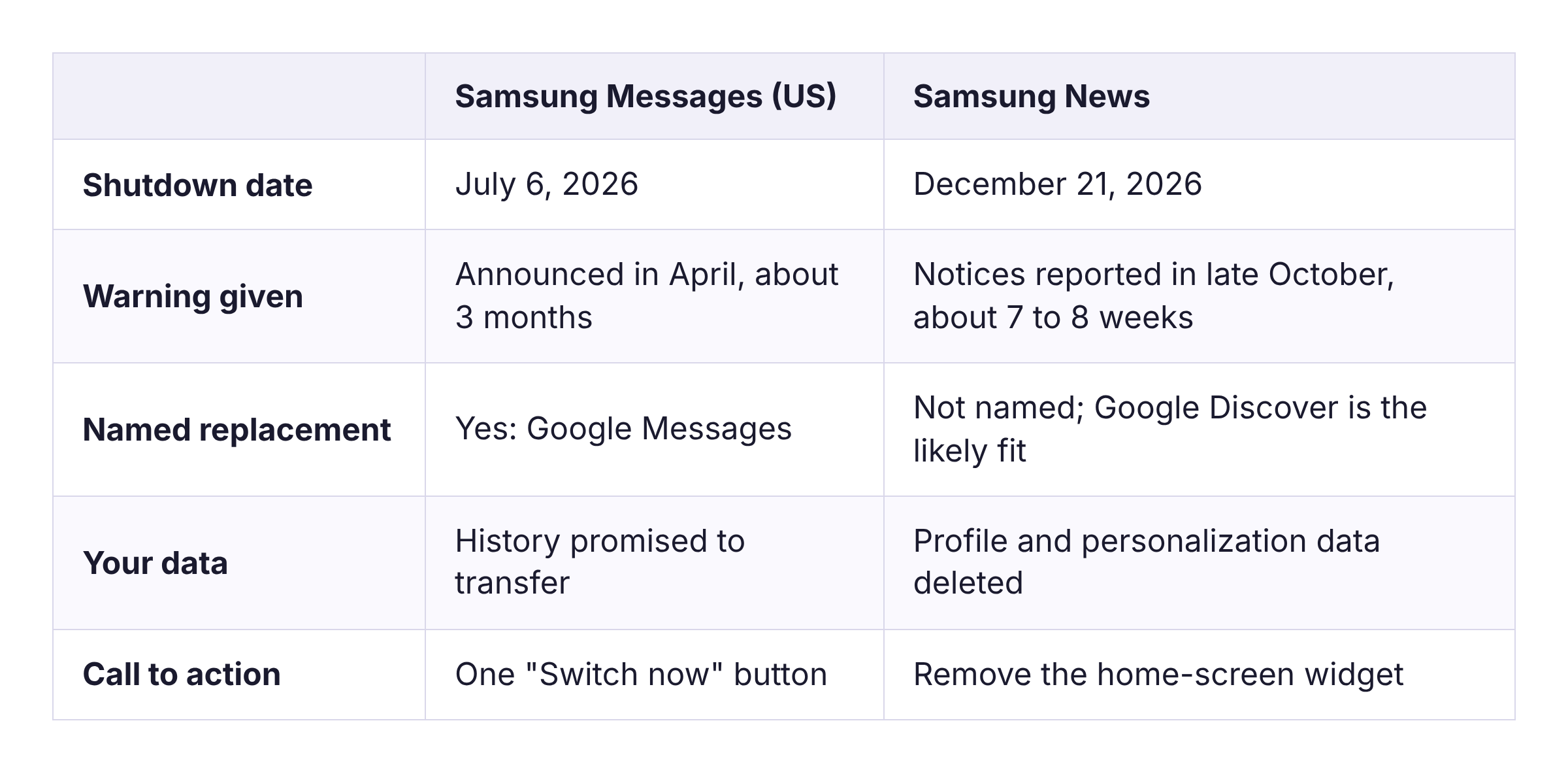
Which approach is clearer? The one that names an alternative and gives customers one clear action to take. Even then, Droid Life notes the replacement lacks some features, like custom categories. Perfect migrations don’t exist. Clear ones do.
The 7-step product sunsetting playbook
Step 1: Find out who actually depends on it
Before making an announcement, check your product usage data. Who uses it daily? Who depends on it for their daily work? Who’s up for renewal soon?
Rework’s guide warns that discovering at-risk accounts at renewal time can be 30 to 90 days too late. Do the homework first.
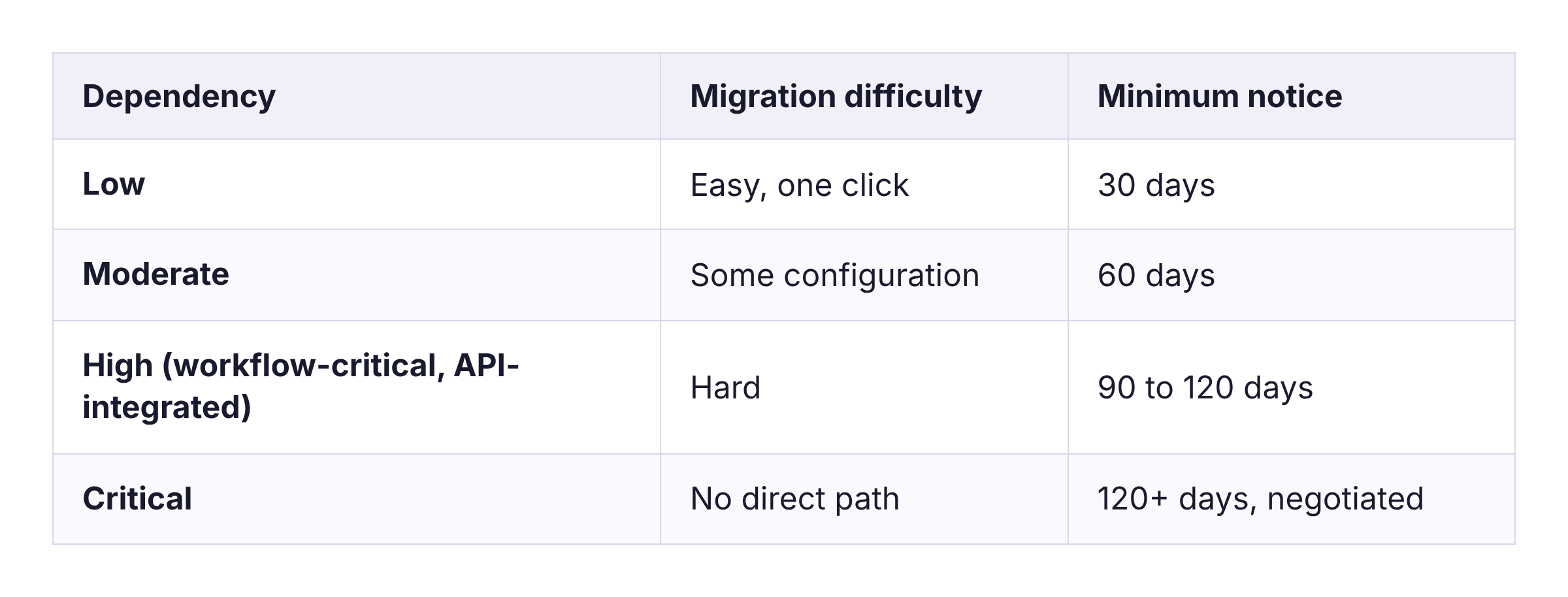
Step 2: Set the notice period by dependency, not by convenience
The same Rework guide recommends giving customers more time when moving away from a product is difficult.
Step 3: Pick one honest reason
Samsung hasn’t explained why News is closing, leaving people to guess the reason. You don’t have to share your strategy. You do have to say something true.
- “We’re focusing on [X] so we can do it better.”
- “Usage dropped and we can’t maintain it responsibly.”
- “We’re merging this into [Y] to give you one simpler experience.”
Keep the explanation to one honest sentence. Avoid vague or overly corporate language.
Step 4: Name the destination
Simply announcing a closure leaves customers with questions. Explaining where they can go next gives them a practical way forward.
Give customers a named alternative, a step-by-step guide for moving their data, and a working way to download their information. If you’re rebranding rather than retiring, show the old name and the new name side by side so nobody wonders if it’s the same product. Our guide on how and when to rebrand your business covers the naming and visual side, and 6 times rebranding saved brands shows what good looks like.
Step 5: Send different messages to different customers
Not every customer needs the same message. Rework’s suggested approach is simple.
- Tier 1 (customers who depend heavily on the product and generate high revenue): a personal call before sending an email.
- Tier 2 (moderate dependency): send an email first, followed by a personal message within 48 hours.
- Tier 3 (low or no dependency): send a clear, standard email.
Step 6: Design the communication like it’s a product launch
Many shutdown notices are written like legal documents, which can make them difficult for customers to understand. This is one of the most-read messages you’ll ever send.
- Put the date in the subject line and the first sentence.
- Use a clean layout with one primary button.
- Add a notice inside the product and an FAQ on your help page that match the email design.
- Keep your brand voice. Calm, warm and direct beats stiff and defensive.
Need ideas for layout? Browse our top email template designs for structure you can adapt.
Step 7: Run it, then review it
Send reminders at 60 and 30 days. Watch support tickets. After shutdown, record what happened: who moved to another product, who left, and who needed extra help. Then write down what you’d change next time. Keeping a record of what happened will help you manage future product shutdowns more effectively.
Rebranding vs. retiring: what changes?
The steps may be similar, but customers have different concerns when a product is discontinued or rebranded.
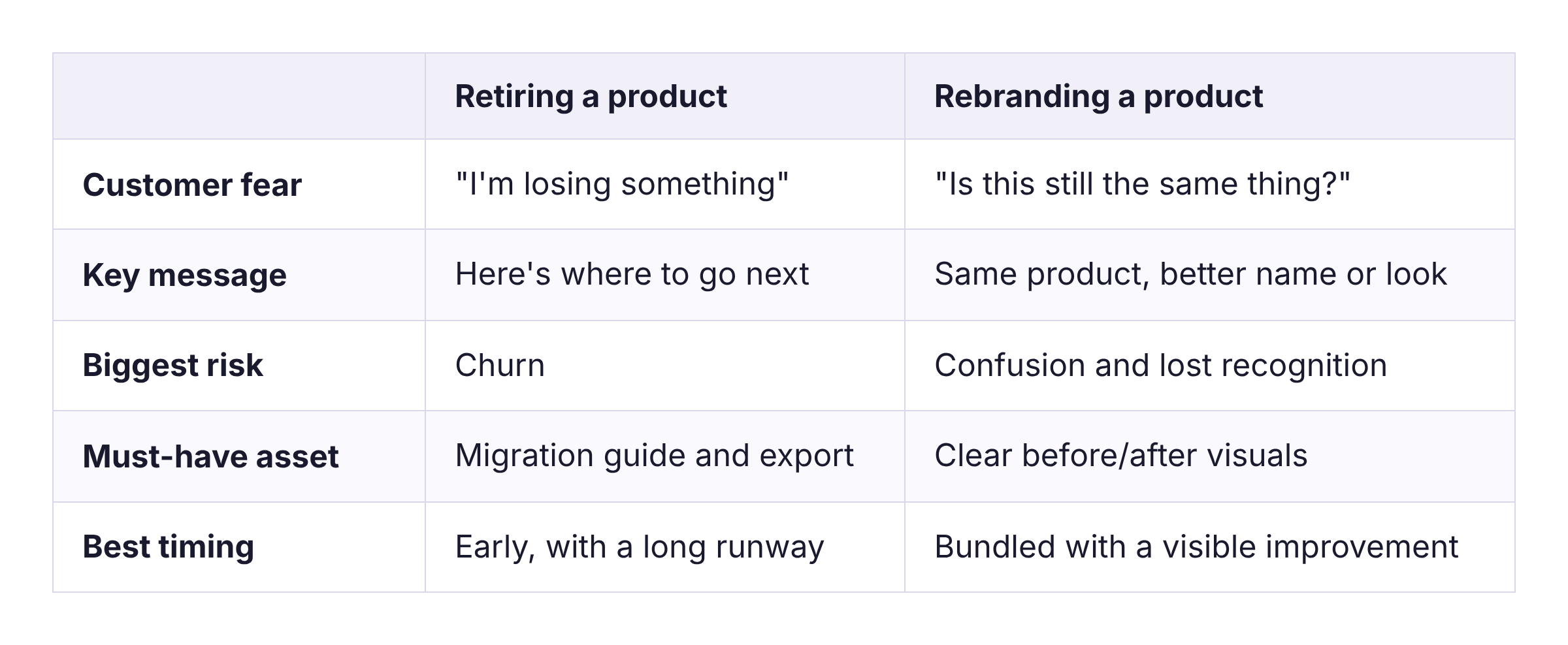
For rebrands, keeping everything consistent helps customers recognize your brand. DesignRush’s 2026 roundup cites a MARQ survey in which 68% of companies said consistent branding contributed 10 to 20% of revenue growth (a self-reported figure, so take it as a signal). Whatever you change, update it everywhere at the same time. Our piece on cohesive branding strategies and techniques shows how.
5 mistakes that quietly kill trust
- Burying the date. If people have to scroll to learn when it ends, you’ve already lost them.
- Deleting data without saying so. Always state what happens to customer data, in plain words.
- No replacement path. Silence about alternatives feels like abandonment.
- Different messages in different places. The email, banner and FAQ must agree.
- Going quiet after the announcement. Remind people, then confirm when it’s done.
Your sunset checklist
- Dependency review done and accounts tiered
- Notice period set from the dependency table
- One-sentence honest reason written
- Named alternative, migration guide and data export ready
- Email, in-app banner and FAQ designed and consistent
- Reminders scheduled at 60 and 30 days
- Post-sunset review booked
Need a hand with the design side?
A product shutdown or rebrand affects many design materials at once: announcement emails, in-app banners, landing pages, help-center graphics, new logo lockups, updated social profiles. That’s a lot of design work to complete in a limited time.
With a Draftss subscription, you get a design team that creates these materials quickly while keeping everything consistent with your brand. Start with our logo and brand identity service for a rebrand, or compare options in the top unlimited graphic design services of 2026. Get your Draftss team started today.